
Welcome to the EasyEngine Dashboard Updates page.
This page provides a chronological record of all enhancements, bug fixes, feature releases, and infrastructure updates made to the EasyEngine Dashboard.
Nov 1, 2025
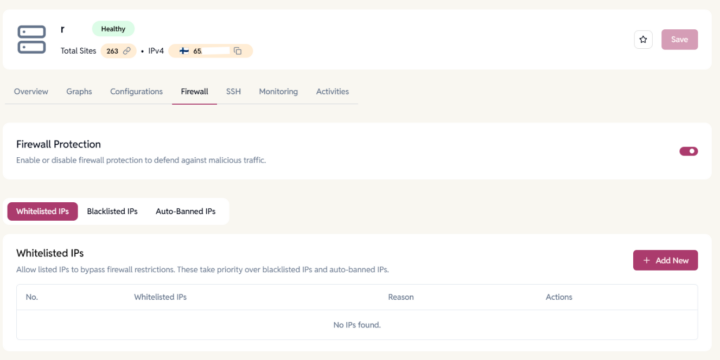
- Firewall Improvements
- Increased ban time from 4 hours to 12 hours.
- Fixed firewall issues for imported servers.
- Enhanced Firewall IP table for easier IP address management, including bulk edits and the ability to move auto-banned IPs into the whitelist or blacklist.
- Backup & Server Configuration
- Added pagination to the Site Backup table for easier navigation.
- Backup retention days updates are now applied across all connected servers automatically.
- Improved logging during server imports with updated rsyslog configuration.
- WP Cloud WordPress Site Enhancements
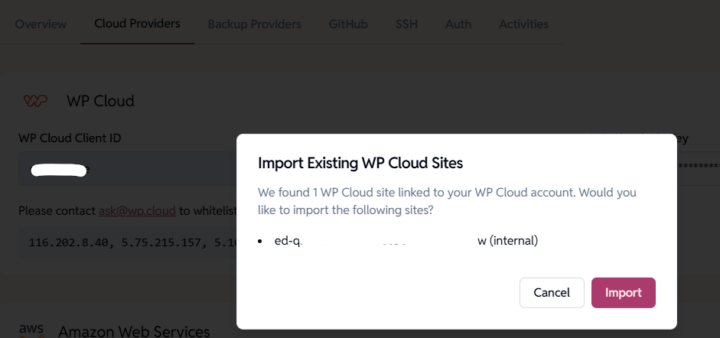
- Added option to import existing WP Cloud sites managed outside the dashboard.
- Improved segregation of WP Cloud site controls for better clarity.
- Fixed permission evaluation issues affecting WP Cloud cron operations.
- Credential & Password Improvements
- Added WordPress and WPC credential reset enhancements.
- Improved WP-CLI password reset reliability by skipping plugin/theme loading.
- Permission Sync Improvements
- Fixed backend sync handling for admin-level actions.
- General Fixes & Optimizations
- Fixed total site count display issues on servers.
- Multiple UI/UX and stability improvements across the dashboard.
- Maintenance & Dependency Upgrades
- Updated helpdesk app and dependencies to latest versions.
- Routine updates to internal packages and libraries (boto3, js-yaml, glob, GitHub action modules, etc.).
Learn More:
- Import your existing WP Cloud WordPress sites into the EasyEngine Dashboard:
Go to Settings → Cloud Provider, add or update your WP Cloud API keys, and click Save. A confirmation popup will appear – simply click Import to bring all eligible WP Cloud sites into your dashboard.
Dec 23, 2025
- Firewall & Security Enhancements
- Fixed duplicate firewall entries when updating ban reasons.
- Enabled searching firewall IPs by IP address and reason.
- Backup Reliability & Notifications
- Introduced asynchronous backups for better performance.
- Backup failure notification emails include the failure reason.
- Improved visibility when SSH users are removed (now shown as comments).
- Server & EasyEngine Improvements
- Added EasyEngine version check during server add/import to prevent incompatible setups.
- Introduced default PHP version selection when adding servers:
- Development servers → latest PHP version (to catch compatibility issues early).
- Production servers → second-latest, more stable PHP version (to reduce risk in live environments).
This helps balance early testing with production stability.
- UI & Experience Enhancements
- Fixed issue preventing access to the dashboard after sign-up.
- Added confirmation popup check for critical admin actions on sites and servers.
- Introduced additional support sidebar items for quicker access to help and resources.