
Organization owners, admins and managers can now request an EasyEngine update across every outdated server in their organization. EasyEngine Dashboard v3.1.0, released on October 16, 2026, also lets owners and admins share servers with child organizations and gives each organization its own notification preferences.
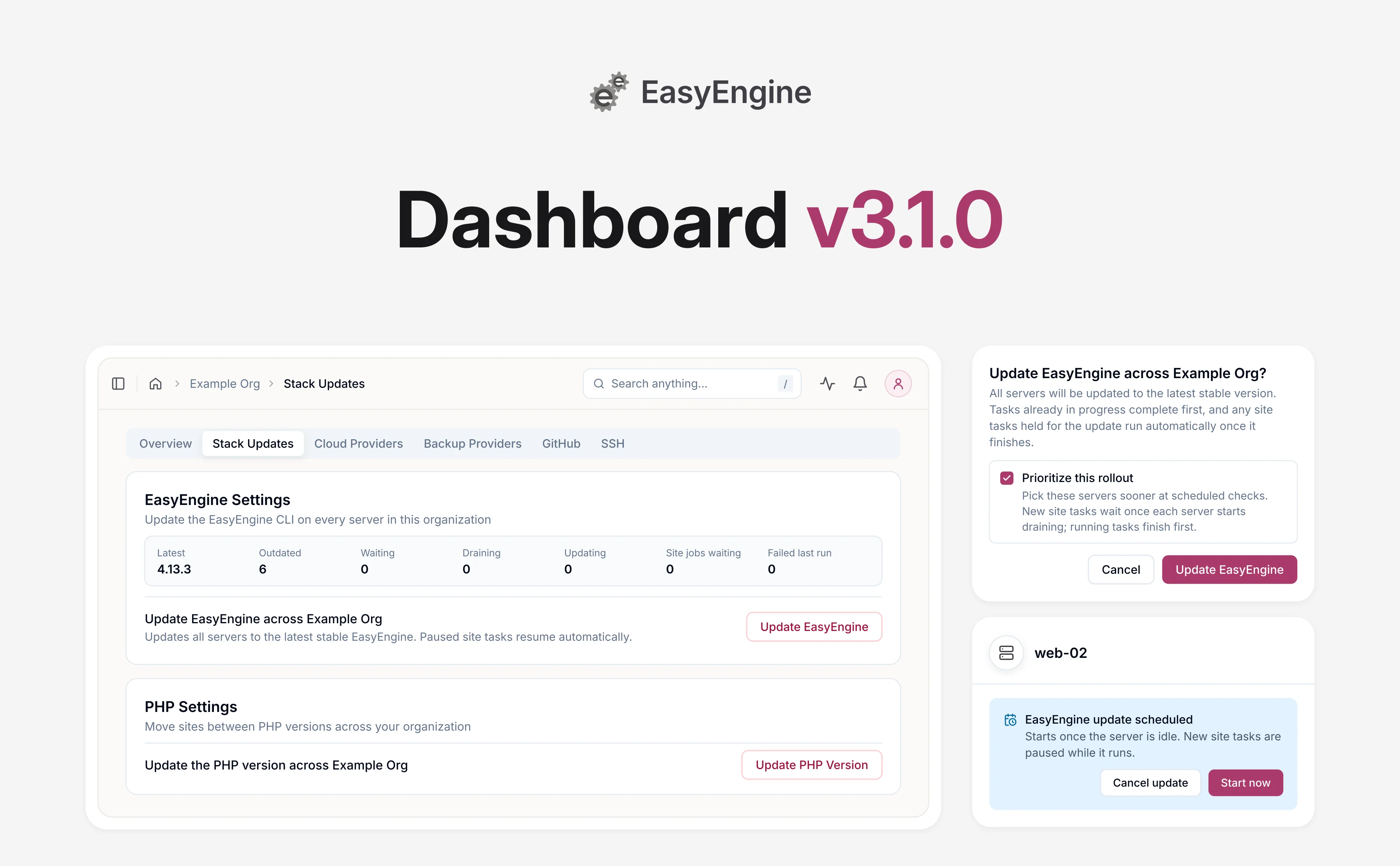
Update EasyEngine on every server at once 🖥️
You can now request an EasyEngine update for every server in an organization at once. Before v3.1.0, each request updated a single server, and only organization owners and admins could make it.
That matters for releases like EasyEngine v4.13.3, released on October 21, 2026, which fixes two critical PHP vulnerabilities. Like every EasyEngine release, it has to be installed on each server. You can roll an update out at two levels:
- Every server in your organization: organization owners, admins and managers get an EasyEngine Settings card on the organization’s Stack Updates tab. It shows how many servers are outdated, and Update EasyEngine requests the update for all of them. For a security release, tick Prioritize this rollout so those servers are picked up sooner.
- A single server: the Update EasyEngine control on a server’s Configurations tab now works for organization managers too. Its dialog has a Start immediately checkbox: tick it to hold new site tasks right away instead of waiting for the server to go idle.
Every update installs the latest stable release and skips servers already on it. Work already running finishes first. New site tasks wait and run automatically once the update completes.
While a server is still waiting, its update banner offers Start now and Cancel update. Whoever requested the update is notified when it completes or fails.
Disabled sites, sites on PHP 8.1 or older, and applications that use session upload progress still need the extra steps in the v4.13.3 post. Moving many sites off PHP 8.1 or older at once is covered in our Security Advisories post.
Share a server with your child organizations 🤝
If your organization has child organizations, as resellers do, they can now create sites on servers you share with them. Sites on a shared server can also move between your organization and a child organization.
- Share a server for site creation: owners and admins can switch on Share with child organizations on the server’s Configurations tab. Child organizations can then pick it when creating a site. Members who aren’t an admin or manager in the child organization see only shared servers in the Development category. They own and manage the sites they create there, but see only the server’s name. Server management stays with you.
- Move a site between organizations: Move to another organization, under a shared-server site’s Admin Actions, hands it to a child organization or back to the organization that owns the server. You need admin rights in both. The site stays on the same server, and its owner becomes the target organization’s owner.
Notification preferences for each organization 📬
If you belong to several organizations, each one now has its own notification settings. They build on the team alerts added in v3.0.
- Your activity and your team’s, separately: My activity covers updates sent to you about the sites and servers you own, including billing and your security digest. Team activity covers what other members did and reaches organization owners, admins and managers. Each has an Email and an In-app switch per notification type, and Security is under My activity only. Account notifications always reach you and have no switch.
- Quiet defaults: everything is on except Team activity email, which is on only for Billing, so a failed payment still reaches the whole team. Preferences you had already customized were carried over.
- A safety check on Billing: turning off Billing under My activity now asks you to confirm first.
You’ll find them on the Settings tab of your profile (account menu, then Profile), for the organization currently selected in the header. The Notification Preferences guide lists every default.
Fixes worth knowing 🔧
Two smaller fixes in v3.1.0 cover PHP version changes and server creation.
- A failed PHP version change now sends an in-app alert and an email (per your notification preferences) and leaves the site’s recorded PHP version unchanged.
- Server creation hides unavailable DigitalOcean plans, and plan cards can be selected again.
Get started with EasyEngine Dashboard v3.1.0
EasyEngine Dashboard v3.1.0 is available to all users, and the Dashboard itself needs no action from you. To update EasyEngine across an organization, open the organization’s Stack Updates tab and click Update EasyEngine in the EasyEngine Settings card.
For a security release, tick Prioritize this rollout, then confirm with Update EasyEngine. A summary lists every server and when its update starts.
We would love to hear how bulk updates and shared servers work for you, and what you would like to see next.
Frequently asked questions
Who can update EasyEngine on every server in an organization?
Organization owners, admins and managers can use the EasyEngine Settings card on the organization’s Stack Updates tab. Other members do not see it. The same three roles can update one server at a time with Update EasyEngine on the server’s Configurations tab.
What happens to servers that are busy or offline when I request an update?
Each server waits until it is idle, and tasks already running, including backups, finish before its update begins. Once a server starts preparing, new site tasks wait and run automatically after the update.
The summary after your request shows each server’s status, such as Starts once the server is idle. An offline or unhealthy server shows Starts once the server is healthy and reachable again. If a server is still waiting after twelve hours, whoever requested the update gets an EasyEngine update needs attention notification.
Which servers and sites does an EasyEngine update leave out?
Servers already on the latest stable EasyEngine release are skipped, and so are servers that already have an update scheduled. The summary lists the second group as An update was already scheduled.
On each server, EasyEngine v4.13.3 skips disabled sites, so they keep the old, unpatched image. It also has no patched image for sites on PHP 8.1 or older. The v4.13.3 post has the steps for both.
Can a child organization change a server I share with it?
A child organization sees only the shared server’s name, and its settings, including Share with child organizations, stay with your organization’s owners and admins. It can still create sites there, and it owns and manages them.
Before Move to another organization hands one of those sites over, remove any SFTP users who are not members of the target organization. A site that uses the server’s default HTTP auth credentials needs new ones first.
Links: Notification Preferences | EasyEngine Dashboard Features | EasyEngine x WP Cloud | Get in touch
On this page